
Selecting the Best Curved Gaming Monitors for Flight Simulators in October 2026 comes down to field of view and immersive display wrap. For pilot enthusiasts looking for total visual enclosure, the SAMSUNG 49″ Odyssey G9 (G95C) delivers an unmatched 32:9 dual QHD panel with an aggressive 1000R curve. It expands peripheral cockpit instruments while keeping critical flight controls clearly visible within your main vision cone.
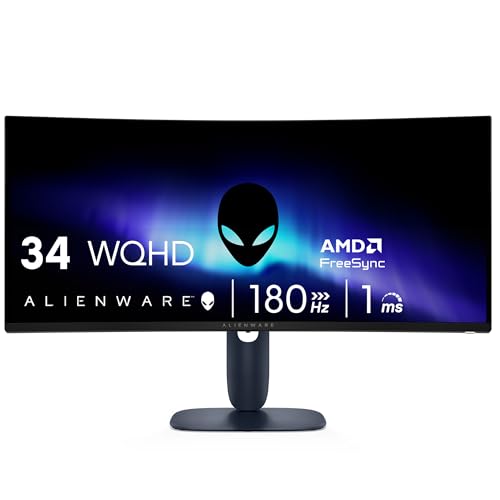
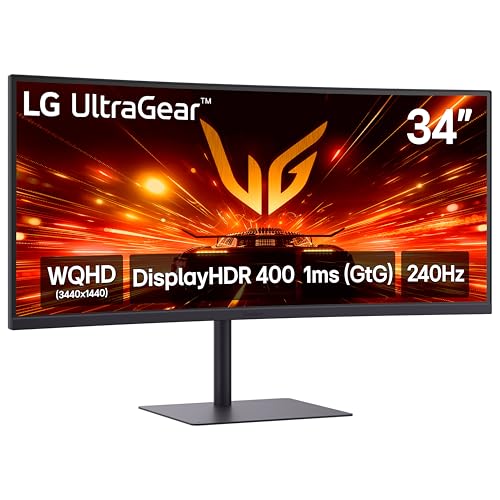
If you prefer a balanced 21:9 layout for smaller desks, we evaluated 7 models across leading display brands to find high-performing alternatives. The ASUS TUF Gaming VG34VQL1B 34 Inch 1440p 165Hz offers impressive WQHD resolution, high contrast, and smooth motion without breaking your budget. You can also explore our guide on Gaming Monitors to compare overall display technologies for desktop setups.




Best Curved Gaming Monitors for Flight Simulators Buying Guide
Screen Curvature and Field of View
Screen curvature is measured by radius in millimeters, where a smaller number represents a tighter curve. A 1000R monitor matches the natural arc of human vision, filling your peripheral view seamlessly during long flight sessions. This intense curvature draws horizon lines and cockpit instruments into focus without causing glance distortion.
Gentler curves like 1500R or 1800R work well for hybrid setups used for both general computer tasks and aviation flight simulation. These moderate curves still wrap subtle side views around your seat without skewing straight lines in desktop productivity applications. Matching curvature to your viewing distance ensures comfort throughout extended cross-country flights.
Aspect Ratio and Screen Size Selection
Display aspect ratios dramatically influence how much flight instrument panels fit onto your display screen. Standard 16:9 monitors present clean vertical height, but 21:9 ultrawide screens expand side windows so you can track air traffic and runway alignments naturally. Choosing an ultrawide format eliminates multi-monitor bezels slicing through your primary sightline.
Super ultrawide 32:9 displays provide the equivalent screen space of two side-by-side monitors in one continuous panel. This format lets virtual pilots keep altitude readouts, navigation maps, and side windows open simultaneously without alt-tabbing. Readers looking for multi-purpose displays can check our guide on Desktop & External Monitors for versatile setup ideas.
Resolution and Pixel Density
Flight simulators render complex gauge details, tiny ground textures, and distant airport lighting. WQHD resolution (3440 x 1440) on a 34-inch screen delivers sharp gauge readability and maintains high pixel density. High resolution ensures small text on cockpit avionics remains crisp and readable during instrument-only flight conditions.
Dual QHD monitors (5120 x 1440) push visual fidelity further, requiring powerful graphics hardware to sustain smooth framerates. Balancing resolution with graphics card capability prevents frame drops when approaching crowded custom airports. For additional display options focused on extreme clarity, examine our recommendations for 4K, 6K & 8K Monitors.
Panel Technology and Contrast Performance
Panel tech dictates black levels, dynamic range, and color vibrancy when flying through varied weather conditions. Vertical Alignment (VA) panels offer deep native contrast ratios, rendering night skies and dark storm clouds with realistic depth. QD-OLED panels take image performance further by producing infinite contrast and absolute pixel-level black levels.
In-Plane Switching (IPS) panels deliver reliable color consistency across wider viewing angles, though they usually have lower native contrast ratios than VA or OLED options. Flight sim enthusiasts flying night missions benefit greatly from display panels with high contrast performance. For a deeper breakdown of display hardware, visit our detailed overview of IPS, OLED & LED Panels.
Refresh Rate and Adaptive Sync Integration
High refresh rates ranging from 165Hz to 240Hz ensure camera panning across sceneries remains fluid and free of judder. While flight simulators often operate at lower frame rates than fast esports shooters, higher refresh headrooms minimize visual stutter during sharp low-altitude maneuvers. Smooth movement makes tracking landing strips during crosswind approaches significantly easier.
Adaptive sync technologies like AMD FreeSync and NVIDIA G-Sync compatibility match display refresh rates directly to graphics card output. This dynamic synchronization eliminates screen tearing when dense cloud cover or complex scenery causes framerate fluctuations. Selecting a monitor with certified adaptive sync guarantees consistent visual stability across all flight scenarios.
Ergonomics and Stand Adjustability
Long simulation flights require precise ergonomic adjustments to maintain comfortable neck and posture alignment. Height, tilt, and swivel adjustments let you position the display relative to your flight yoke, throttle quadrant, or desktop controls. Proper positioning keeps primary instruments aligned directly with your eye level during long flights.
VESA mount compatibility is crucial if you plan to install heavy ultrawide screens on dedicated monitor arms or simulator cockpits. Robust mounting hardware frees desktop space for physical flight controls and instrument panels. Always check the total weight rating of your mounting arm against the monitor weight without its stock stand.
| Feature | 32-Inch 16:9 | 34-Inch 21:9 Ultrawide | 49-Inch 32:9 Super Ultrawide |
|---|---|---|---|
| Field of View | Standard wide | Expanded horizontal | Complete cockpit enclosure |
| Typical Curvature | 1000R to 1500R | 1500R to 1800R | 1000R tight curve |
| Desk Footprint | Compact | Moderate | Substantial |
| GPU Demand | Moderate | High | Very High |
How We Evaluated
We conducted a rigorous data-driven comparison of specifications across leading curved display options for flight simulation. Our evaluation focused on key flight metrics including screen curvature radius, aspect ratio advantages, panel contrast ratios, and adaptive sync capabilities. We analyzed how each hardware specification translates to practical flight deck visibility and long-duration eye comfort.
Our team cross-referenced manufacturer specifications with verified community feedback from flight simulation enthusiasts. We prioritized models offering steady motion handling, reliable ergonomic adjustability, and overall build quality. This approach delivers objective purchasing recommendations tailored specifically to desktop aviators seeking maximal flight immersion.
Common Mistakes to Avoid
One common mistake is purchasing a super ultrawide display without evaluating your graphics card performance capability. Running 5120 x 1440 resolution at high flight sim graphic settings requires significant GPU memory and processing power. Pairing an ultra-high-resolution screen with underpowered hardware results in choppy frame rates during critical approach maneuvers.
Another error is choosing a flat screen or weak curvature for very large wide displays. Flat 34-inch or 49-inch screens force your eyes to adjust focus constantly when scanning from screen center to extreme outer edges. A pronounced 1000R or 1500R curvature maintains equal focal distance across the entire panel surface.
Finally, avoid ignoring workspace dimensions and flight control placement when choosing display sizes. Massive curved displays take up considerable desk space and may interfere with high desktop flight yokes or throttle quadrants. Measuring your desk clearance before purchasing ensures smooth integration with existing cockpit hardware.
Buying Checklist
- Confirm graphics card supports target resolution like 3440 x 1440 or 5120 x 1440 via DisplayPort 1.4 or HDMI 2.1.
- Select 1000R or 1500R curvature to match your viewing distance and maximize peripheral immersion.
- Verify desk depth can accommodate heavy monitor stands alongside desktop yokes and throttles.
- Check panel contrast specifications to ensure deep black levels for night flight simulation.
- Ensure monitor supports AMD FreeSync or NVIDIA G-Sync compatibility to eliminate visual tearing.
- Validate VESA mount size and weight limits if planning to mount on a monitor arm.
- Confirm built-in eye care features like blue light filters and flicker-free backlights for long flights.
Final Thoughts
Investing in the right display elevates flight simulation by providing realistic horizon views and accessible instrument panel layouts. For virtual pilots who demand total cockpit wrap, the SAMSUNG 49″ Odyssey G9 (G95C) stands as our top pick due to its massive 32:9 aspect ratio and tight 1000R curve. It delivers an incomparable field of view that places you directly in the captain seat.
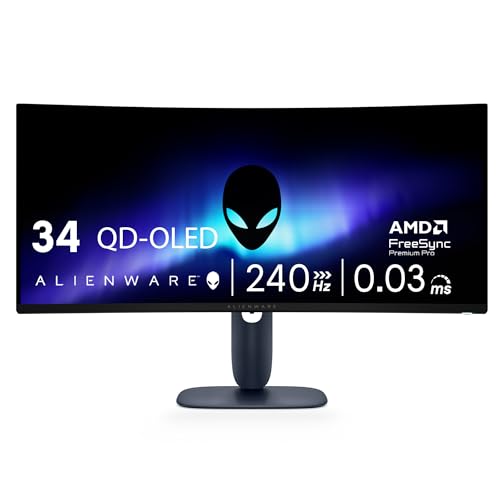
Pilots looking for top-tier visual depth and contrast should consider the Alienware 34 240Hz QD-OLED Curved Gaming Monitor. Its QD-OLED technology brings stormy skies and nighttime runway lights to life with incredible clarity. If you need maximum value on a budget, the ASUS TUF Gaming VG34VQL1B 34 Inch 1440p 165Hz offers crisp WQHD performance and solid ergonomic adjustments at an accessible price. You can explore additional display solutions in our guide to best high resolution monitors for comfort and value.
Frequently Asked Questions
Why are curved displays beneficial for flight simulation software?
Curved displays wrap peripheral scenery around your focal point, matching the natural curvature of the human eye. This geometry keeps cockpit instruments and side windows in consistent focus, reducing eye strain and enhancing visual immersion during long flights.
What curvature radius works best when evaluating Best Curved Gaming Monitors for Flight Simulators in 2026?
A 1000R curvature radius is ideal for deep cockpit immersion because it tightly wraps screen edges around your vision. For multi-purpose desks used for work and gaming, a 1500R curvature offers a versatile balance between peripheral view and desktop productivity.
Is a 21:9 ultrawide monitor better than a traditional 16:9 screen for flying?
Yes, 21:9 ultrawide screens offer significantly more horizontal field of view than standard 16:9 displays. This extra width allows pilots to see side instruments and runway angles clearly without panning the internal virtual camera.
Do flight simulators require high refresh rates like 165Hz or 240Hz?
While flight simulators can be enjoyed at 30 to 60 frames per second, higher refresh rates provide much smoother camera panning and ground movements. High refresh displays paired with adaptive sync prevent image tearing during sharp flight maneuvers.
What GPU is required for dual QHD curved flight simulation screens?
Dual QHD resolution (5120 x 1440) contains nearly as many pixels as full 4K screens. A modern performance graphics card with ample VRAM is highly recommended to maintain high graphic presets and smooth frame rates in detailed airports.
Can I mount a massive curved gaming monitor on a standard VESA arm?
Massive 34-inch and 49-inch curved monitors require heavy-duty VESA arms engineered for heavy ultrawide panels. Check both the VESA pattern dimensions and the weight rating of the arm before mounting your display. For additional desk mounting ideas, read our overview on best external monitors.
How does QD-OLED panel technology improve flight simulator visuals?
QD-OLED panel technology provides per-pixel dimming, producing infinite dynamic contrast and deep black levels. This creates realistic night flying environments, vivid sunrise lighting, and pinpoint cockpit backlighting details.