

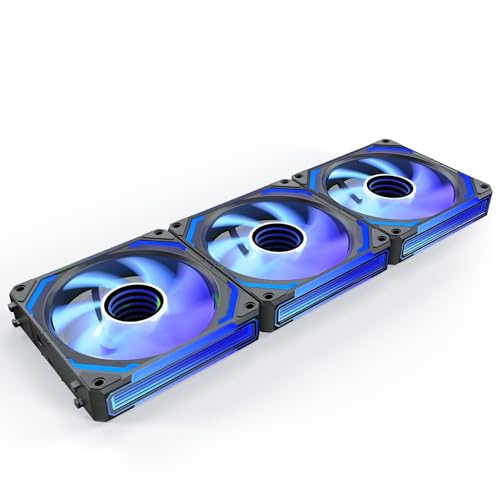
Finding the ideal cooling setup for a glass enclosure requires balancing powerful intake airflow with clean internal cable management. For overall aesthetic appeal and thermal performance, the AsiaHorse COSMIQ 120mm Case Fan delivers exceptional infinity mirror illumination alongside daisy-chain wiring that keeps your chamber free of excess wires. If you want maximum quiet performance without lighting distractions, the Noctua NF-F12 PWM, High-Performance Quiet Fan offers legendary static pressure to pull air through dense dust filters.
For builders looking to populate an entire mid-tower on a budget, the Thermalright 5 Pack TL-C12C-S CPU Fan 120mm ARGB presents an unmatched value proposition. When building a complete setup, pairing proper case airflow with high-grade visual gear like gaming monitors ensures your entire desk ecosystem runs cool and looks fantastic. We analyzed 7 top options in October 2026 to find the Best PC Fans for Tempered Glass Cases for every budget.





Best PC Fans for Tempered Glass Cases Buying Guide for 2026
Static Pressure vs Airflow CFM
Glass enclosures present unique ventilation challenges compared to traditional mesh cases because solid side panels restrict direct air intake paths. Standard high-airflow fans often struggle to draw sufficient fresh air through narrow side slots or bottom filter meshes. Selecting fans with elevated static pressure ratings ensures air penetrates restrictive intake channels and radiator fins effectively.
Static pressure is measured in millimeters of water gauge (mmH2O), while overall movement volume uses cubic feet per minute (CFM). For glass chassis front and side mounts, target static pressure ratings above 1.5 mmH2O to overcome resistance. Maintaining balanced air intake prevents heat buildup near sensitive internal hardware and prevents performance throttling under heavy gaming workloads.
Cable Management and Interlocking Daisy Chaining
Visible interior hardware is the defining characteristic of glass enclosures, making unsightly fan cables instantly noticeable. Traditional setups require two individual cables per fan for power and lighting, which quickly creates a complex tangle across your motherboard tray. Modern interlock systems allow multiple fans to clip directly together while sharing a single combined cable connection.
Single-frame multi-fan units simplify assembly even further by combining three 120mm fan positions into one single chassis module. Reducing seven or eight separate wires down to one clean connection improves internal build appearance and prevents cable obstruction around intake blades. If you enjoy optimizing your total workspace layout, check out our guide on desktop & external monitors for clean desktop ergonomics.
ARGB Lighting, Mirror Depth, and Glass Reflections
Illumination behaves differently behind tinted or clear glass compared to open mesh panels. Edge lighting and hub-mounted LEDs can create harsh glare spots if light diffusion is insufficient across the fan blades. Premium infinity mirror designs utilize layered internal glass elements to produce captivating depth effects that look polished through transparent panels.
Ensure your selected fans utilize standard 5V 3-pin addressable RGB headers for seamless software synchronization across your hardware components. Advanced lighting modules require adequate motherboard header bandwidth or specialized external hub controllers to display complex multi-LED patterns smoothly. Matching your case lighting rhythm with vibrant screens, such as modern IPS, OLED & LED panels, builds an immersive visual experience.
Bearing Types and Acoustic Noise Levels
Solid glass panels block some direct fan motor noise, but low-frequency vibrations can easily resonate through the metal frame of the enclosure. Hydrodynamic and Fluid Dynamic Bearings (FDB) utilize pressurized oil channels to minimize mechanical friction during high-speed rotation. This construction significantly reduces motor hum and dramatically extends operating lifespan compared to basic sleeve bearings.
Look for fans rated below 28 decibels at peak rotational speed to maintain a peaceful room environment during intensive gaming. Anti-vibration rubber pads installed at each mounting corner further decouple fan frames from the metal chassis sheet. Utilizing precise Pulse Width Modulation (PWM) speed curves keeps fan speeds low during casual desktop usage while ramping up smoothly under load.
Frame Thickness and Clearance Compatibility
Standard computer fans measure 25mm in depth, fitting comfortably in nearly all standard case mounting positions and radiator setups. However, high-performance integrated fan frames can measure 28mm thick to accommodate specialized lighting rings and unified structural frames. Checking your graphics card clearance and top radiator clearance before installation prevents unexpected fitment conflicts.
When mounting thick fans to top-mounted liquid cooling radiators, clear memory module height is often the main constraint. Verify that your motherboard VRM heatsinks and RAM sticks leave sufficient vertical space below the chassis roof. Proper clearance measurement ensures smooth air exit through top exhaust vents without physical interference against expensive core components.
How We Evaluated
Our comparative analysis focuses on objective performance metrics, structural engineering quality, and real-world installation dynamics. We evaluated manufacturer specification sheets across maximum static pressure ratings, total CFM volume, operational noise levels, and mechanical bearing architecture. Special attention was given to cable reduction features, software control versatility, and structural framing stability inside modern dual-chamber enclosures.
We analyzed compatibility across mainstream motherboard headers, ARGB LED controller power requirements, and radiator mounting dimensions. By comparing practical cable routing solutions against thermal delivery efficiency, we identified options that deliver quiet operation alongside clean visual presentation. You can also explore our practical advice in our How To section for helpful desktop configuration guides.
Common Mistakes to Avoid
Overlooking static pressure ratings when installing intake fans behind restrictive glass panels is a frequent error. Standard airflow-optimized blades fail to pull adequate outside air through narrow side gaps, leading to elevated interior case temperatures. Always verify that your intake position fans provide sufficient pressure to overcome panel resistance.
Failing to count the total ARGB LED quantity across multiple lighting fans can overload standard motherboard addressable RGB headers. Standard headers typically support up to 80 individual LEDs per channel, while multi-fan infinity mirror packs can quickly exceed this limit. Adding a dedicated ARGB hub prevents lighting flickering and protects motherboard headers from current overload.
Ignoring fan mounting direction often ruins chassis air balance and compromises internal thermal efficiency. Glass enclosures rely heavily on structured directional airflow to push hot GPU exhaust out through top and rear vents. Installing intake fans in reverse orientation starves components of fresh cool air and allows dust accumulation.
Buying Checklist
- Verify fan static pressure exceeds 1.5 mmH2O for glass panel intake positions.
- Check whether your motherboard has available 4-pin PWM and 5V 3-pin ARGB headers.
- Confirm total LED count does not exceed your motherboard lighting channel capacity.
- Select FDB or Fluid Dynamic Bearings for low noise and long operational life.
- Measure chassis clearance for 28mm thick fan frames near RAM and GPU positions.
- Choose daisy-chain or single-frame fans to minimize visible cable clutter.
- Ensure anti-vibration rubber corners are included to prevent frame resonance.
Final Thoughts
Selecting the Best PC Fans for Tempered Glass Cases comes down to matching your visual ambitions with necessary cooling capabilities. For builders who prioritize stunning illumination and neat cable management, the AsiaHorse COSMIQ 120mm Case Fan delivers an impressive balance of static pressure, low noise, and interlocking simplicity. If maximum visual simplicity is your goal, the integrated single-frame JONSBO XA-360B PC Case Fan eliminates cable mess entirely.
Builders who value absolute silent operation above RGB aesthetics should choose the time-tested performance of the Noctua NF-F12 PWM, High-Performance Quiet Fan. Meanwhile, outfitting a complete system on a reasonable budget is easiest with the multi-pack value offered by the Thermalright 5 Pack TL-C12C-S CPU Fan 120mm ARGB. Pairing clean interior fan lighting with high-resolution visual displays like best hi res monitors creates a sleek and quiet desktop workstation.
Frequently Asked Questions
Are high static pressure fans required for glass cases?
Yes, static pressure fans are strongly recommended for glass enclosures because intake ventilation is restricted to narrow slots or filtered vents. High static pressure allows fan blades to force air through tight gaps effectively, maintaining cool internal temperatures for your components.
How do daisy-chain fans improve builds in Best PC Fans for Tempered Glass Cases in 2026?
Daisy-chain fans link together using interlock connectors, allowing multiple units to share a single power and lighting cable. This arrangement eliminates cluttered wiring behind clear glass panels, creating a cleaner aesthetic while simplifying system assembly.
Do infinity mirror fans consume more electrical power?
Infinity mirror fans use internal light reflections to create visual depth without adding significant power draw. The actual power draw comes from the embedded LED count and fan motor, which standard 12V fan headers and 5V ARGB headers handle easily.
What is the ideal fan configuration for glass PC cases?
The optimal setup uses positive air pressure with more intake fans than exhaust fans to prevent dust ingress through tiny gaps. Intake air should enter from the front or bottom panels, while exhaust air exits through the top and rear vents.
Can 28mm thick fans fit on standard liquid cooling radiators?
Most liquid cooling radiators accommodate 28mm fans, but you must check clearance between your radiator assembly and motherboard components. In compact cases, the extra 3mm of fan thickness can potentially interfere with tall memory modules or VRM heatsinks.
How do FDB bearings reduce noise in glass enclosures?
Fluid Dynamic Bearings float the rotating shaft on a thin layer of pressurized lubricant, eliminating metal-to-metal contact during operation. This mechanical design prevents low-frequency noise and humming vibrations from transferring into your computer chassis.
Do I need an external controller for multi-LED ARGB fans?
If your fan arrangement features dozens of individual ARGB LEDs across multiple frames, an external powered controller is recommended. Standard motherboard ARGB headers have maximum current limits, and a controller ensures bright, stable lighting without overloading system headers. For recommendations on complementary workspace equipment, see our guide to best external computer monitors.



