

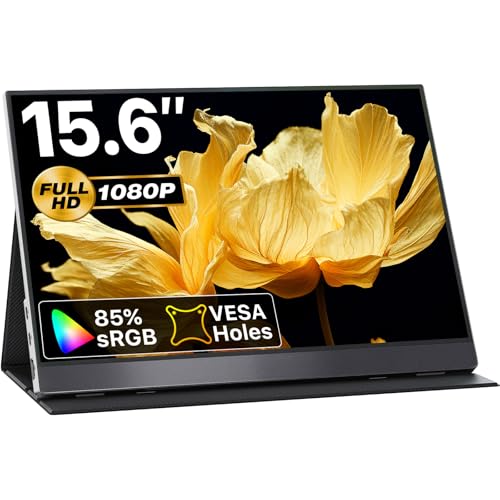
Working efficiently away from a dedicated desk requires a lightweight secondary display that connects without complicated hardware. For October 2026, the KYY Portable Monitor 15.6inch 1080P FHD USB-C stands out as our top recommendation for mobile professionals. It combines balanced 1080p IPS visuals, broad device compatibility, and a dependable magnetic stand cover.
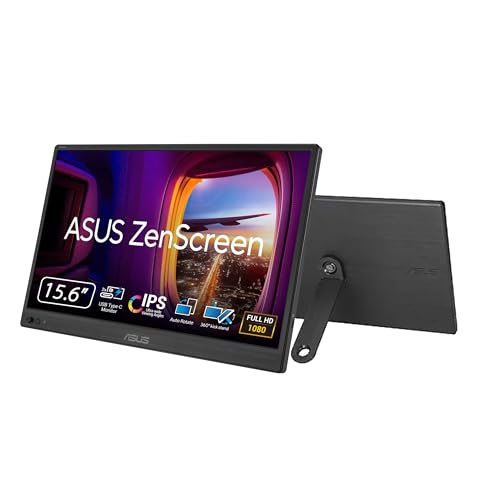
If you prefer an ultralight option from an established hardware maker, the ASUS ZenScreen 15.6” Portable Monitor for Laptop delivers certified eye-care features and a built-in kickstand. Remote workers evaluating travel displays can also contrast them with standard best external monitors to determine the best balance between screen size and mobility.


Best Portable Monitors for Travel Buying Guide
Display Panel and Visual Quality
Choosing the right panel type directly affects readability when working in unpredictable travel environments. Most travel displays use IPS technology to maintain clear colors and wide 178-degree viewing angles when viewed off-center. Understanding modern IPS panel technology ensures you choose a screen that resists washed-out visuals under bright ambient lighting.
Full HD 1080p resolution remains the standard sweet spot for 15.6-inch portable displays. Higher resolutions like 4K draw significantly more power from your laptop battery while providing diminishing clarity returns on small diagonal screens. A matte anti-glare finish also prevents harsh reflections in airport lounges, cafes, and sunlit hotel rooms.
Connectivity and Cable Architecture
Port selection determines whether you can operate with a single streamlined cord or require a messy tangle of cables. Full-featured USB-C ports with DisplayPort Alternate Mode support transmit video signal and operating power through one connection. This clean setup lets you power the secondary display directly from your laptop battery during brief work sessions.
Devices lacking full-function USB-C ports must rely on HDMI or Mini-HDMI video cables alongside a dedicated USB power wire. When connecting gaming consoles or older computers, verify whether the package includes all required adapters. You can browse our guide to dedicated HDMI monitors to see how connectivity standards compare across fixed and mobile screens.
Weight, Thickness, and Portability
Total travel weight makes the difference between an indispensable travel accessory and dead weight left behind at home. Most 15.6-inch mobile screens weigh between 1.4 and 1.8 pounds without their protective cases. Keeping the overall package under two pounds ensures your backpack remains comfortable during long airport layovers.
Profile thickness is equally important when sliding a secondary screen into a standard laptop compartment. Ultra-slim profiles measuring approximately 0.3 inches slip cleanly alongside your laptop without straining bag zippers. Durable aluminum alloy enclosures offer better rigidity against daily travel compression compared to flexible plastic housings.
Stand Stability and Ergonomics
A portable display is only as useful as its ability to stand securely on uneven surfaces. Many models rely on magnetic folding smart covers made from PU leather that double as two-position stands. While lightweight, folding covers can occasionally slip if bumped on cramped coffee shop tables or tray tables.
Integrated mechanical kickstands provide superior stability and offer stepless angle adjustments up to 90 degrees. Some models also incorporate standard VESA mounting holes or tripod sockets for modular travel arms. The right stand mechanism ensures you can match your laptop height and maintain an ergonomic posture while working remotely.
Power Management and Pass-Through Charging
Mobile displays draw their operating power directly from host devices unless plugged into an external wall outlet. Running high brightness levels on single-cable USB-C can drain your laptop battery faster than normal. Selecting an energy-efficient display prevents unexpected power loss during critical mobile assignments.
Advanced travel screens feature power pass-through charging capabilities across dual USB-C ports. Connecting a wall charger to the monitor allows it to power the display while simultaneously charging the connected laptop. This functionality reduces the number of wall plugs required when setting up your workstation in hotel rooms.
How We Evaluated
Our evaluation methodology focuses on objective specification analysis, connection compatibility, and real-world travel usability across 7 models. We compared panel specifications including resolution, contrast ratios, and color gamut ratings to determine everyday clarity. Port selections, included accessory packages, and chassis materials were verified directly against manufacturer technical documentation.
We also analyzed practical ergonomics, including cover stability, weight distribution, and eye-care certifications. Power consumption figures and cable configurations were reviewed to identify which units operate reliably without requiring supplementary wall adapters. This data-driven approach highlights options that deliver dependable performance for remote professionals and digital nomads.
Common Mistakes to Avoid
Assuming all USB-C ports transmit video is the most frequent error travel monitor buyers encounter. A standard USB-C charging or data port cannot send video signals without DisplayPort Alt Mode or Thunderbolt support. Always verify your laptop specifications before expecting a one-cable connection to function.
Overlooking display finish and brightness ratings often leads to severe eye strain in bright environments. High-gloss screens create distracting reflections in sunlit spaces that make reading spreadsheets and documents difficult. Choosing a matte IPS panel with anti-glare treatment prevents unwanted ambient reflections.
Ignoring total pack weight with accessories can lead to uncomfortably heavy travel bags. Magnetic cases, wall power adapters, and supplementary cables can add substantial bulk to your carry-on load. Choose models that include lightweight all-in-one cables to keep your overall mobile footprint minimal.
Buying Checklist
- Verify your laptop USB-C port supports Thunderbolt 3/4 or DisplayPort Alt Mode video output.
- Check that the total monitor weight is under 1.8 pounds for comfortable daily commuting.
- Confirm the display uses a 1080p IPS panel with wide 178-degree viewing angles.
- Ensure the package includes necessary USB-C to USB-C, USB-A to USB-C, and HDMI cables.
- Choose a matte anti-glare screen surface if you frequently work in cafes or brightly lit areas.
- Inspect whether the stand mechanism provides multiple viewing angles without slipping.
- Confirm the monitor features dual USB-C ports if you plan to use pass-through power charging.
Final Thoughts
Equipping your mobile workstation with the right travel display dramatically improves daily multitasking and productivity on the road. For most travelers, the KYY Portable Monitor 15.6inch 1080P FHD USB-C represents the best overall balance of slim portability, crisp IPS clarity, and dependable build quality. Its versatile magnetic smart cover and plug-and-play simplicity make setting up a dual-screen workspace seamless.
If you need an ultra-affordable secondary display for study sessions or occasional travel, the MNN Portable Monitor 15.6inch FHD 1080P 60Hz USB C provides excellent value with full HD performance. Creative professionals requiring richer color accuracy should consider the VisionOwl Portable Monitor 15.6 Inch 1080P FHD 85% for its enhanced color gamut. You can also explore our broader selection of computer displays to discover more workstation solutions.
FAQs
Can I power Best Portable Monitors for Travel with just one USB-C cable?
Yes, single-cable operation works if your host laptop supports DisplayPort Alt Mode or Thunderbolt 3, 4, or 5 over USB-C. This connection transmits both video signal and power simultaneously from the computer battery.
What is the top-rated option among Best Portable Monitors for Travel in 2026?
The KYY Portable Monitor 15.6inch 1080P FHD USB-C is our top-rated overall pick for 2026. It combines reliable plug-and-play USB-C connectivity, full HD resolution, and a durable magnetic stand cover.
Do portable travel monitors require special drivers to function?
Most modern portable monitors operate as true plug-and-play devices without requiring third-party drivers or software. They function immediately upon connection across Windows, macOS, ChromeOS, and compatible game consoles.
Are portable travel monitors compatible with gaming consoles like Nintendo Switch and PS5?
Yes, these displays connect to gaming consoles via HDMI or full-featured USB-C ports. Consoles generally require connecting an external power adapter to the monitor to ensure adequate power delivery during gaming sessions.
How do travel monitors compare to standard desktop and external monitors?
Travel monitors emphasize lightweight construction and USB bus-power, making them easy to pack into a briefcase. While conventional desktop and external monitors offer larger screen sizes, portable models provide unparalleled flexibility on the road.
Can I use a portable monitor in portrait orientation?
Yes, most portable screens support portrait orientation for reading code, documents, or vertical spreadsheets. You can adjust the display orientation settings directly within your computer operating system display control panel.
Why does my portable monitor flicker or restart when connected to my laptop?
Screen flickering usually indicates that the host device USB port cannot deliver sufficient electrical current at high brightness levels. Connecting an external 15-watt or higher power adapter to the monitor secondary USB-C port resolves this issue.
Will using a portable monitor drain my laptop battery rapidly?
Operating a secondary screen over a single cable will increase laptop battery consumption during portable use. Lowering the monitor brightness setting or connecting an external power supply helps extend battery runtime when working remotely.








