

Producers seeking high capacity and extreme transfer rates should choose the Sandisk 4TB Extreme Portable SSD for heavy virtual instrument setups. This rugged unit handles demanding multi-track DAW recording with transfer rates up to 2000MB/s across 7 evaluated drives in October 2026.
For artists needing a dependable and compact balance of price and performance, the Samsung T7 Portable SSD 1TB Titan Gray serves as our top value selection for mobile tracking. It pairs seamlessly with modern laptop rigs and desktop and external workstation gear while preventing thermal throttling.



Buying Guide for Best Portable SSDs for Music Production: Studio Drives
Sustained Read and Write Speeds
Audio production relies heavily on sustained read speeds to stream large orchestral sample libraries and high-resolution plugins in real time without audio dropouts. High-bandwidth NVMe drives prevent latency spikes and buffer under-runs during intensive digital audio workstation playback.
When recording multi-track live sessions, fast write performance ensures that simultaneous raw 24-bit or 32-bit audio files write directly to disk without corrupting buffers. Drives operating at 1050MB/s or 2000MB/s reduce project load times and eliminate recording bottlenecks.
Connection Interface and Host Compatibility
External solid state drives use different USB protocols that dictate real-world transfer limits across Mac and Windows studio computers. A USB 3.2 Gen 2 interface supports up to 10Gbps bandwidth, while USB 3.2 Gen 2×2 unlocks up to 20Gbps on compatible motherboards.
Checking host port compatibility ensures your drive achieves maximum rated speeds rather than falling back to slower legacy protocols. For producers integrating external monitors for studio production alongside audio interfaces, dedicated USB-C connectivity prevents bus sharing bottlenecks.
Storage Capacity and Library Organization
Modern virtual instruments and Kontakt sample collections often exceed several hundred gigabytes for a single professional orchestral package. Investing in at least 1TB to 4TB of external flash storage provides adequate space for sound expansions and project archives.
Partitioning or dedicating external drives specifically for sample streaming keeps your primary operating system drive uncluttered and responsive. This separation protects critical project data and ensures your operating system maintains sufficient swap space during heavy mixing sessions.
Thermal Management and Throttling Prevention
Sustained high-speed data transfers generate heat that can force an uncooled portable SSD to throttle its speed down to hard drive levels. Aluminum chassis enclosures act as passive heat sinks to disperse warmth effectively during continuous audio streaming.
Consistent thermal dissipation keeps read and write performance predictable across long recording sessions and prevents DAW disk overload warnings. Learning effective workflow habits from our studio setup tutorials helps optimize drive placement away from hot amplifier exhausts.
Enclosure Durability and Studio Mobility
Mobile music producers and touring audio engineers require external hardware that withstands frequent transport between studios and live stages. Drives with IP65 ingress protection resist accidental liquid spills, studio dust, and drops up to three meters onto hard floors.
Compact form factors fit neatly into laptop bags and gear cases without adding excess weight to your touring rig. Solid aluminum or rubberized outer shells protect sensitive internal flash memory chips from mechanical shocks during transit.
Data Integrity and Hardware Encryption
Unreleased master recordings and commercial client stems represent valuable intellectual property that warrants robust hardware-level security. Built-in 256-bit AES encryption protects confidential session files from unauthorized access if a drive is misplaced on tour.
Advanced flash controllers featuring wear leveling, bad block management, and error correction code maintain file integrity over years of continuous use. These proactive background technologies safeguard critical multi-track takes against sudden silent data corruption.
How We Evaluated
We evaluated 7 external solid state drives by analyzing verified manufacturer specifications, sustained data throughput figures, and enclosure thermal designs. Our review assessed how each drive balances read speeds, transfer consistency, and connector versatility for modern audio production workflows.
We also compared physical durability ratings, hardware encryption capabilities, and pricing metrics across leading brands like Samsung, Sandisk, OSCOO. This objective analysis highlights storage solutions that provide dependable performance for both desktop mixing desks and mobile recording rigs.
Common Mistakes to Avoid
Underestimating capacity requirements is a frequent error that forces producers to juggle multiple drives across active projects. Selecting a drive with at least twice your current sample library size ensures room for future virtual instrument expansions.
Connecting high-speed NVMe drives through unpowered USB hubs often introduces transfer bottlenecks and power instability. Always connect your primary audio drive directly to a high-speed motherboard port to maintain uninterrupted bandwidth.
Ignoring file system formatting can cause compatibility errors when collaborating across macOS and Windows recording workstations. Formatting your external audio drive with exFAT or APFS according to your studio setup prevents file permission conflicts.
Relying on a single portable SSD for both active tracking and permanent archival risks total data loss if hardware fails. Always establish a secondary backup routine using cloud storage or duplicate local drives to safeguard irreplaceable master sessions.
Buying Checklist
- Verify read speeds meet or exceed 1050MB/s for real-time sample streaming.
- Choose a minimum storage capacity of 1TB to accommodate growing virtual instrument libraries.
- Confirm your computer supports USB 3.2 Gen 2 or Gen 2×2 to achieve maximum rated speeds.
- Ensure the enclosure uses aluminum or rubberized armor for efficient heat dissipation and drop protection.
- Check for 256-bit AES hardware encryption to protect unreleased client masters and stems.
- Look for built-in error correction and bad block management to prevent audio file corruption.
- Confirm the package includes both USB-C and USB-A cables or adapters for universal studio connectivity.
Final Thoughts
Equipping your audio workstation with the right external solid state drive transforms project load times and keeps multi-track recordings stable. For producers managing extensive virtual instrument collections, the Sandisk 4TB Extreme Portable SSD delivers exceptional capacity alongside blistering 2000MB/s transfer rates.
Musicians needing a lightweight and dependable companion for field recording should consider the Samsung T7 Portable SSD 1TB Titan Gray for its solid aluminum body and sustained 1050MB/s performance. It pairs effortlessly with laptops and dedicated studio desktop screens during editing sessions.
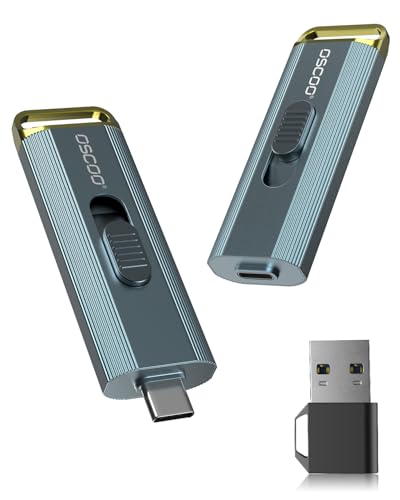
Producers seeking high speed on a balanced budget will appreciate the OSCOO 1TB External SSD Drive with its versatile adapter kit and reliable thermal management. Selecting the drive matching your specific studio workflow ensures smooth, uninterrupted music creation throughout 2026.
Frequently Asked Questions
Why is an external SSD preferred over an HDD for music production?
External SSDs deliver read and write speeds over ten times faster than mechanical hard drives, eliminating disk overload errors during playback. This instant data retrieval allows virtual instruments and massive sample libraries to load without latency or dropped audio samples.
What capacity should I choose among Best Portable SSDs for Music Production: Studio Drives in 2026?
A 1TB drive provides adequate space for active recording sessions and essential sample collections, but 2TB to 4TB is recommended for large orchestral libraries. Choosing higher capacity prevents drive clutter and ensures adequate free space for high-speed cache management.
Can I run my DAW software directly from a portable SSD?
You should install your primary DAW software and operating system on your internal drive while storing project files and sample libraries on the external SSD. This distributed workload optimizes bandwidth across separate drive controllers and prevents system lag.
What transfer speed is necessary for recording multi-track audio without dropouts?
Read and write speeds of 1050MB/s provide more than enough headroom to track dozens of simultaneous 24-bit 96kHz audio channels reliably. Advanced 2000MB/s drives offer even greater efficiency when copying massive session folders and loading multi-gigabyte synthesizer patches.
Does a portable SSD require external power when connected to a laptop?
Modern portable solid state drives draw power directly through the host USB-C or USB-A bus without requiring an external AC wall adapter. This bus-powered design makes them ideal for mobile laptop studios and remote field recording rigs.
How does thermal throttling affect audio recording on external SSDs?
When an external drive overheats during long sessions, its internal controller automatically reduces transfer speeds to protect flash memory chips. Choosing drives with aluminum enclosures prevents thermal throttling and keeps audio streams stable during intensive studio sessions paired with computer display setups.
Is hardware encryption necessary for music production drives?
Hardware encryption with 256-bit AES safeguards confidential client stems, unreleased album tracks, and commercial licensing files from theft. It adds a critical layer of professional security without impacting real-time audio playback or read speeds.
Can I format a portable SSD for both Mac and Windows recording studios?
Formatting your portable SSD using the exFAT file system allows seamless read and write access across both macOS and Windows operating systems. This universal format makes sharing session folders between different studio computers fast and hassle-free.





