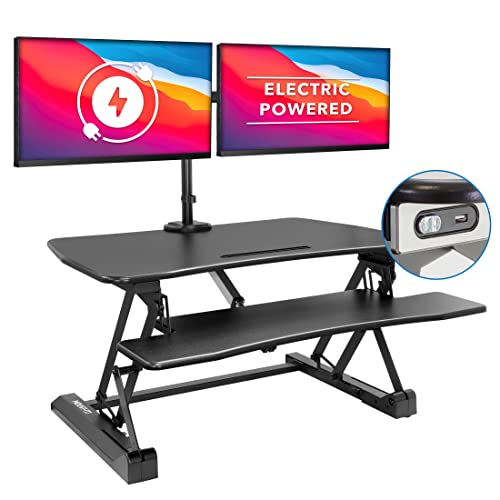
Switching between sitting and standing throughout the day protects your spine and maintains steady energy levels. For professionals seeking effortless push-button adjustment, the SANODESK 42″ Electric Standing Desk Converter stands out with its spacious dual-tier platform and whisper-quiet motor. You can explore our How To workstation setups to see how motorized risers optimize daily productivity.
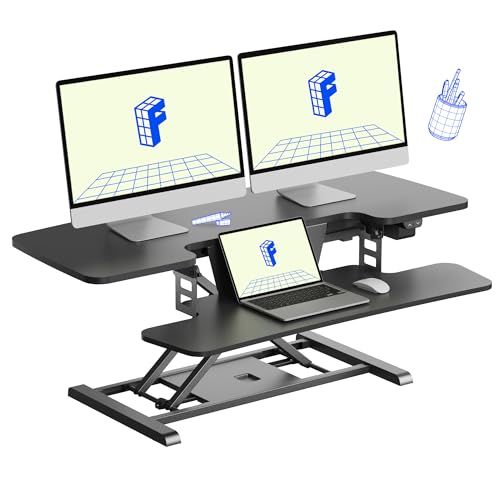
If you manage a compact workstation or operate within a tighter footprint, the FLEXISPOT 32″ Electric Standing Desk Converter delivers dependable motorized lifting in a streamlined frame. Our comparison of 10 models across Mount-It!, VERSADESK, VIVO and more in October 2026 shows that electric risers provide superior stability over traditional gas-spring designs.



Best Motorized Standing Desk Converters: Smooth Height Lift Buying Guide
Motor Reliability and Lifting Capacity
The internal electric motor represents the core component of any motorized desk converter. A high-quality motor provides quiet, frictionless vertical elevation that prevents coffee spills and monitor shuddering during transitions.
Lifting capacity varies significantly across different models, generally spanning from 33 pounds up to 80 pounds. Heavy setups with dual screens, heavy monitor arms, and desktop speakers require risers with robust frames to avoid straining the internal gearing over time.
Desktop Dimensions and Multi-Screen Compatibility
Worksurface width directly determines the display configurations your converter can support. While a 32-inch platform suits a single screen and a compact laptop, pairing two displays requires a width between 36 and 48 inches.
Pairing your converter with high-resolution screens such as Best High Resolution Monitors for Comfort and Value ensures crisp text rendering at standing eye level. Always confirm that the depth of the top tier accommodates your monitor stands without crowding the keyboard deck.
Vertical Height Travel and Ergonomic Range
Proper ergonomic standing posture requires the top of your monitor screen to sit at or slightly below eye level. Most electric converters offer an adjustment range between 4.7 inches and 19.7 inches above your base tabletop.
Taller individuals over six feet must pay close attention to maximum elevation limits to prevent neck strain. Combining your riser with a flexible monitor arm helps bridge any height gaps for perfect viewing alignment.
Keyboard Tray Geometry and Wrist Alignment
An ergonomic lower tier keeps your elbows bent at a natural 90-degree angle when typing. The best converters feature deep, wide keyboard trays that comfortably fit full-sized mechanical keyboards alongside standard precision mice.
Some models feature keyboard trays that drop completely flush with the desk surface at the lowest setting. This design prevents wrist extension when you return to a seated position during standard computer tasks.
Frame Stability and Weight Distribution
Structural rigidity is critical when working at full standing extension. Heavy-gauge carbon steel frames and thickened alloy tubes eliminate typing wobble and lateral swaying under daily keyboard pressure.
Vertical X-lift and Z-lift mechanisms distribute weight differently across your underlying furniture. Straight up-and-down vertical lift designs are particularly valuable for compact workspaces because they do not push your body backward as they rise.
Power Convenience and Cable Management
Integrated electronic features elevate everyday convenience in a modern home office. Many premium converters incorporate built-in USB charging ports, tablet docking slots, and safety lock switches to prevent accidental height changes.
Managing cord slack is essential when elevating hardware connected to Best Desktop Monitors for Comfort, Value and Clarity. Integrated grommet holes and cable clips keep power cords organized and prevent dangerous snagging during motorized movement.
| Converter Feature | Standard Specifications | Ergonomic Advantage |
|---|---|---|
| Lifting Mechanism | Electric single motor (4.7 to 19.7 inch travel) | Smooth one-touch adjustment without back strain |
| Weight Capacity | 33 lbs to 80 lbs support | Stable support for dual monitors and mounting arms |
| Platform Width | 26 to 48.5 inch dual-tier surfaces | Dedicated zones for displays and input peripherals |
| Keyboard Tier | Flush drop to 35 inch wide deck | Neutral wrist posture during seated and standing work |
How We Evaluated
We evaluated each motorized converter by analyzing verified manufacturer specifications, structural load ratings, and motor acoustics. Our assessment focused on real-world stability at maximum height extension and desktop surface utility.
We also examined assembly requirements, keyboard tray ergonomics, and multi-monitor compatibility. This data-driven comparison ensures you receive dependable recommendations based on mechanical reliability and daily usability.
Common Mistakes to Avoid
Exceeding the maximum weight rating by mounting heavy accessories is a frequent error. Overloading the motorized mechanism strains the electric motor and leads to premature mechanical failure.
Overlooking the physical depth of your existing office desk can result in severe overhang. Always verify that your base furniture accommodates the full footprint of the converter base before ordering.
Forgetting to provide adequate cable slack causes wires to stretch or detach during elevation. Leave generous cord slack for power leads, video connections, and peripheral cables to ensure safe movement.
Ignoring keyboard tier height when seated can create uncomfortable wrist angles. Select a converter with a low-profile lower platform to maintain natural forearm posture throughout the day.
Buying Checklist
- Confirm your existing desk depth and width can accommodate the base footprint of the converter.
- Calculate the combined weight of your monitors, laptops, mounts, and desk accessories against the load rating.
- Verify that the maximum vertical travel reaches eye level for your specific standing height.
- Check that the keyboard tray provides sufficient width for both your keyboard and mouse side by side.
- Ensure the motor operates quietly if you work in a shared office or open home environment.
- Look for integrated USB charging ports and device slots if you frequently charge mobile hardware.
- Confirm whether the lift system moves straight up or arcs forward into your standing space.
- Inspect cable routing grommets to ensure clean wire management for all connected displays.
Final Thoughts
Choosing the right electric riser transforms your daily work routine into a dynamic, spine-friendly experience. For broad workstations needing spacious multi-screen room, the SANODESK 42″ Electric Standing Desk Converter delivers exceptional surface area and reliable motor performance.
When working in tighter office layouts, the FLEXISPOT 32″ Electric Standing Desk Converter offers fantastic value with whisper-quiet lifting and a compact footprint. Users with corner workstations should consider the VERSADESK PowerPro 36 Inch Electric Corner for its impressive 80-pound carbon steel construction and safety lock protection.
Pairing your motorized workstation with Best Quality Monitors for Comfort and Value You Need guarantees sharp visual clarity while standing. Investing in a motorized converter allows you to build an active, healthy workspace without replacing your current desk.
Frequently Asked Questions
What are the advantages of motorized standing desk converters over manual gas-spring models?
Motorized converters eliminate physical exertion by adjusting height smoothly at the push of a button. They prevent sudden drops, jerky movements, and back strain when elevating heavy dual-monitor configurations.
How much weight can Best Motorized Standing Desk Converters: Smooth Height Lift support in 2026?
Most standard motorized converters support between 33 and 55 pounds on their top surfaces. Heavy-duty commercial models engineered with reinforced carbon steel can safely lift up to 80 pounds of office equipment.
Can I attach monitor arms to an electric standing desk converter?
Yes, many models feature integrated grommet holes designed specifically for standard monitor arm clamps. You can also pair these converters with Best External Monitors: Choose Comfort and Value using compatible VESA mounting hardware.
Will a motorized standing desk converter fit on my existing home office desk?
Most converters require a flat desktop surface measuring at least 24 to 30 inches deep. Always measure your desk surface before purchasing to ensure the base feet rest securely without dangerous overhang.
Are electric desk converters noisy when raising or lowering?
Modern motorized desk converters utilize whisper-quiet motors that produce minimal ambient sound during elevation. They operate smoothly without disrupting colleagues in shared offices or family members at home.
Do motorized desk converters require extensive assembly out of the box?
Most electric converters arrive nearly preassembled directly from the factory. You typically only need to attach the keyboard tray with a few screws and plug in the power supply before using the workstation.
What is the ideal standing height setting for proper desk ergonomics?
When standing, your elbows should rest comfortably at a 90-degree angle on the keyboard platform. The top third of your monitor screen should align directly with your horizontal eye line to minimize neck fatigue.
What should I look for among Best Motorized Standing Desk Converters: Smooth Height Lift for small desks?
For smaller desks, look for a compact 26-inch or 32-inch model featuring straight vertical elevation. Straight vertical lifting ensures the converter does not extend forward into your room or crowd limited workspace.