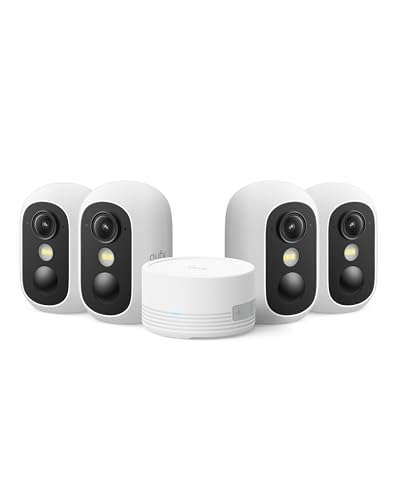
Finding reliable security without monthly service fees requires hardware designed for direct on-device or hub-based local recording. The eufy Security eufyCam C35 4-Cam Kit delivers exceptional multi-camera coverage with on-device artificial intelligence and encrypted hub storage. It gives homeowners comprehensive property monitoring while keeping private video files inside the house.
For single-point monitoring or budget setups, the WYZE Cam v4 (Latest Model) offers crisp resolution and continuous microSD recording. In our October 2026 roundup of 10 options for Best Security Cameras Without a Subscription: Local Picks, these options stand out for reliability and privacy. Learn more about optimizing your home setup in our How To guide.




Best Security Cameras Without a Subscription: Local Picks Buying Guide
Choosing surveillance equipment that avoids ongoing cloud fees involves evaluating specific hardware features and storage technologies. Selecting the right hardware ensures your video archives remain secure, accessible, and high quality throughout 2026.
Local Storage Architecture and Central Hubs
Storage architecture forms the backbone of any subscription-free security system. Standalone cameras record directly to an internal microSD card, while multi-camera systems often route footage to a central indoor base station. Central hubs provide better theft resistance because footage remains safe inside even if an outdoor camera is removed.
MicroSD storage on individual cameras offers flexibility and lower upfront investment for single-room or porch coverage. However, onboard memory cards can wear out faster under heavy continuous write cycles compared to centralized solid-state drives. Upgrading to high-endurance cards ensures longevity when recording event clips or continuous surveillance streams.
Power Source and Solar Integration
Power delivery determines both mounting flexibility and ongoing maintenance requirements. Battery-powered units allow cable-free installation anywhere on your property, but require periodic recharging unless paired with dedicated solar panels. Integrated solar panels maintain steady battery levels with just a few hours of direct daily sunlight.
Continuous 24/7 recording typically demands a hardwired power connection rather than standard battery power. Wired cameras never sleep, capturing every passing second rather than relying on motion activation triggers. For monitoring high-traffic driveways or retail entryways, hardwired cameras paired with dedicated desktop displays like those in our Desktop & External Monitors section provide uninterrupted live viewing.
Resolution and Sensor Image Quality
Video resolution directly influences your ability to identify unfamiliar faces and distant vehicle license plates. Standard 1080p sensors often produce pixelated digital zoom results, whereas 2K, 2.5K, and 4K sensors preserve vital forensic details. Higher resolution requires greater storage capacity, making smart compression standards like H.265 essential.
Sensor aperture and night vision technology are equally crucial when evaluating overall visual clarity. Large physical apertures capture ambient light effectively, enabling full-color night vision without requiring harsh blinding floodlights. Evaluating clarity across different lighting environments ensures consistent monitoring day and night.
On-Device AI and False Alarm Filtering
Cloud-free cameras must process computer vision algorithms locally on their internal hardware chips. On-device artificial intelligence classifies movement into distinct categories such as humans, pets, vehicles, and packages. This local processing delivers instant push alerts without sending raw video streams across third-party remote servers.
Accurate filtering prevents notification fatigue caused by swaying tree branches, shifting shadows, or flying insects. Advanced systems allow users to customize detection zones and adjust sensor sensitivity directly inside mobile applications. Investing in capable on-device AI ensures that every alert on your phone represents a meaningful event.
Wireless Connectivity and Base Station Range
Reliable wireless connectivity ensures smooth live streaming and prevents dropped recordings during critical events. Dual-band support operating across 2.4 GHz and 5 GHz bands provides both broad penetration through thick walls and high-bandwidth data transfers. Many dedicated base stations also function as proprietary wireless repeaters to extend perimeter range.
When setting up remote perimeter cameras along fence lines, verifying signal strength is crucial before drilling permanent mounting brackets. Stable data transmission allows instant video playback without frustrating buffer delays. To view your multi-camera grid on high-clarity screens, explore our Best Quality Monitors for Comfort and Value You Need for dedicated workstation viewing.
| Storage Type | Primary Advantage | Ideal Deployment | Expansion Limit |
|---|---|---|---|
| Indoor HomeBase Hub | Theft-proof indoor security | Multi-camera whole-home kits | Up to 1TB or 16TB HDD |
| On-Camera MicroSD | Lowest upfront hardware cost | Single entryways and apartments | Up to 512GB per camera |
| Local Network NAS/RTSP | Open ecosystem integration | Custom advanced home setups | Multi-terabyte arrays |
How We Evaluated
Our evaluation examined technical specifications, local data storage mechanisms, wireless networking protocols, and optical sensor performance across 10 leading products. We analyzed local encryption standards, base station expansion capacities, and power efficiency data across various operating temperatures.
We prioritized devices that provide full software features and detection alerts without locking essential capabilities behind paywalls. Every recommendation reflects a balanced assessment of hardware build quality, field-of-view coverage, and long-term user ownership value.
Common Mistakes to Avoid
Relying on standard consumer microSD cards instead of high-endurance cards is a frequent error. Continuous video overwriting degrades standard flash memory quickly, leading to corrupted files when you need evidence most.
Placing solar-powered units under heavy roof eaves or dense tree canopies limits daily charging efficiency. Solar panels require unshaded exposure to keep onboard batteries topped up through overcast weather periods.
Neglecting local base station placement can severely weaken wireless signals to outdoor perimeter cameras. Placing the base unit centrally in your home reduces physical wall interference and maintains responsive video streams.
Overlooking camera mounting angles can cause infrared glare to bounce off nearby walls or rain gutters. Angling lenses slightly downward eliminates backscatter and improves facial identification accuracy during nighttime recording.
Buying Checklist
- Confirm the system stores video locally on a microSD card or central indoor hub without subscription fees.
- Check that the camera supports high-endurance memory cards with sufficient capacity for loop recording.
- Verify dual-band Wi-Fi compatibility with your home router for stable long-range video transmission.
- Ensure on-device AI handles human and vehicle detection locally without requiring paid cloud unlocks.
- Assess weatherproofing ratings such as IP65 or IP66 for outdoor cameras exposed to severe rain and snow.
- Evaluate power options to determine whether integrated solar panels or hardwired connections fit your location.
- Confirm two-way audio and mobile app notification response times meet your day-to-day security expectations.
Final Thoughts
Securing your home does not require signing up for endless monthly cloud subscriptions. The eufy Security eufyCam C35 4-Cam Kit represents our best overall recommendation due to its centralized indoor storage, effortless magnetic mounting, and smart on-device recognition features. It delivers reliable perimeter awareness while keeping all your private surveillance archives stored safely at home.
If you need an affordable standalone camera for a porch or living room, the WYZE Cam v4 (Latest Model) offers impressive 2.5K image clarity and continuous local recording. For extensive outdoor coverage requiring active pan-and-tilt tracking, the REOLINK Argus PT Ultra First 4K Solar Security provides sharp 4K clarity backed by solar power.
Selecting the right subscription-free system depends on your property layout, mounting preferences, and desired resolution. For advice on pairing security monitors with secondary home displays, consult our guide on Best Desktop Monitors for Comfort, Value and Clarity.
Frequently Asked Questions
How do security cameras store footage without a paid monthly subscription?
Subscription-free security cameras store video recordings locally onto onboard microSD cards or centralized indoor base stations. When the storage fills up, the camera automatically loops over the oldest footage unless specific event clips are locked or downloaded.
What is the top-rated option among Best Security Cameras Without a Subscription: Local Picks in 2026?
The eufy Security eufyCam C35 4-Cam Kit ranks as a premier choice for 2026 due to its HomeBase hub, local AI intelligence, and multi-camera coverage. It provides complete home protection without locking any advanced features behind recurring paywalls.
Can I still receive mobile notifications without a cloud subscription?
Yes, local storage cameras send real-time push notifications directly to your smartphone through their companion mobile applications. On-device AI chips analyze movement locally and transmit alerts instantly across your home internet connection.
What happens to my recorded video if someone steals an outdoor camera?
Cameras that utilize an indoor base station keep your footage completely safe because the physical storage drive sits inside your home. However, standalone cameras that rely solely on onboard microSD cards will lose saved footage if the physical camera is removed.
Do solar-powered security cameras work during cloudy or rainy days?
Solar security cameras feature internal rechargeable batteries that keep the device running during stormy weather or extended cloudy periods. Most high-efficiency solar panels only require a few hours of daylight each week to maintain continuous operational power.
Is 2K or 4K resolution necessary for home security cameras?
Higher resolutions like 2K and 4K provide essential sharpness when zooming in to read license plates or recognize unfamiliar faces at a distance. If you monitor high-resolution streams on your desktop, check out our 4K, 6K & 8K Monitors category for compatible display hardware.
Can local storage security cameras record continuously 24 hours a day?
Most hardwired local cameras support continuous 24/7 video recording directly to a large microSD card or network drive. Battery-powered models typically record motion-triggered event clips to conserve battery reserves and prolong hardware operating life.
How much memory card capacity is needed for local camera recording?
A 64GB to 128GB high-endurance microSD card generally holds several weeks of motion-triggered event clips in high-definition video. For continuous 24/7 recording setups, a 256GB or 512GB card is recommended to retain multiple days of continuous surveillance history.